


 Fashion for Ladies


Price: $89.99
(as of Jul 09, 2026 19:21:55 UTC – Details)
Product description


1 Smart Touchscreen
2 TFT Touchscreen Keyboard
3 Screen Firmware Update


1 Tri-Mode Connection
2 Keyboard Connection Steps


1 RGB Custom Keyboard
2 Pre-lubed Switches
3 FN Combination Function
4 Ergonomic Keyboard
5 8000mAh Battery
Mechanical Keyboard & Magnetic Switch Gaming Keyboard From Strikonx
Add to Cart
Add to Cart
Add to Cart
Add to Cart
Add to Cart
Add to Cart
Add to Cart
Customer Reviews
4.0 out of 5 stars 3
3.8 out of 5 stars 20
4.5 out of 5 stars 20
4.1 out of 5 stars 33
4.3 out of 5 stars 47
4.3 out of 5 stars 47
5.0 out of 5 stars 8
Price
$99.99$99.99
$89.99$89.99
$79.99$79.99
$59.99$59.99
$49.99$49.99
$49.99$49.99
$79.99$79.99
Touch Screen
✔
✔
✘
✘
✘
✘
✘
Hot-Swappable
✔
✔
✔
✔
✔
✔
✔
RGB Light Box
✘
✘
✔
✔
✘
✘
✘
Connectivity
Tri-Mode,2.4G/BT5.1/Wired
Tri-Mode,2.4G/BT5.1/Wired
Tri-Mode,2.4G/BT5.0/Wired
Wired,USB-C
Wired,USB-C
Wired,USB-C
Tri-Mode,2.4G/BT5.0/Wired
Keyboard Type
Wireless Mechanical Keyboard
Wireless Mechanical Keyboard
Silent Mechanical Keyboard
Hall Effect Magnetic Keyboard
Hall Effect Magnetic Keyboard
Hall Effect Magnetic Keyboard
Wireless Aluminum Keyboard
Backlight
RGB
RGB
RGB
RGB
RGB
RGB
RGB
Keycap Material
PBT
PBT
Clear Keycap
ABS
Side Printed ABS
Side Printed ABS
ABS
Keyboard Layout
96% Layout,84 Keys
96% Layout,84 Keys
98% Layout,95 Keys
98%,101 Keys
75%,82 Keys
75%,82 Keys
98%,101Keys
Switch Type
Caramel Latte switches
Caramel Latte switches
Crystal Switch
Wing Chun Magnetic Switch
White Jade Magnetic Switch
Graywood Magnetic Switch
White Dragon Linear Switch
How to fix a black screen?
1. Press any key to check.
2. Use FN+Backspace to toggle the screen.
3. Press FN+Esc to restart the keyboard.
4. If still not working, download firmware update from soaidriver.com (see video for details).
How to download the software driver? Is it compatible with Mac?
1.Download the software via : soaidriver.com
2.This Aula L99 mechanical keyboard is compatible with Windows, Mac, iOS and Android systems, but the software only supports Windows and requires wired mode.
How to customize image animations and personalize the screen?
1.Download and install the Aula L99 driver in wired mode with windows system.
2.Open the software, find the IPS Screen option, and click to upload an image or GIF.
What should I note when charging the L99 keyboard?
1.Use original cable & computer USB port only.
2.Do not use phone fast chargers,or overvoltage adapters.
How to adjust the backlight of Aula L99?
Adjust backlight color via on-screen colors or shortcut keys.
FN+\I=switch 19 lighting effects;FN+Tab=switch lighting colors,FN+↑/↓=lighting brightness+/-;FN+←/→=lighting speed.
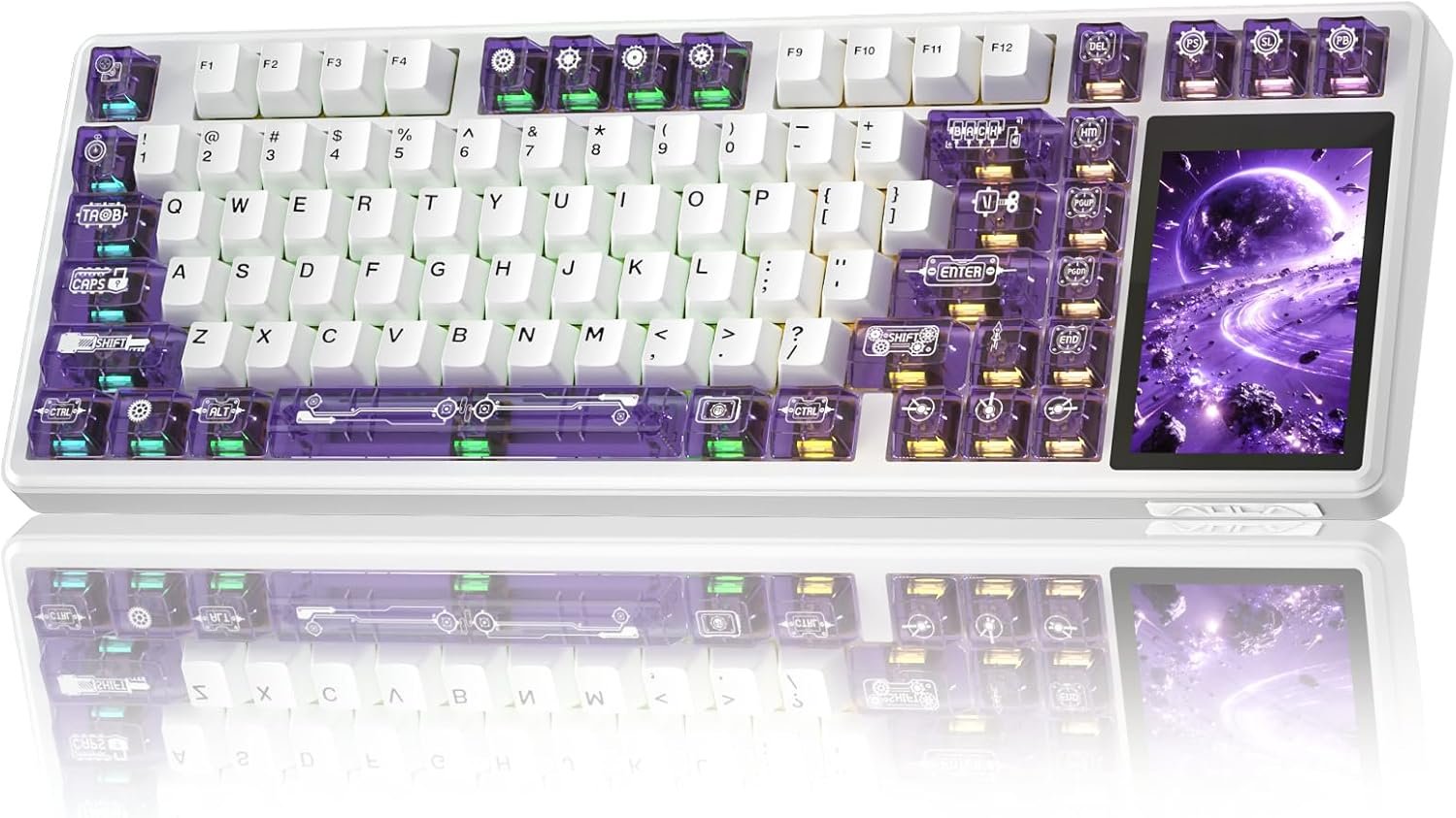
96% Layout & 3.98″ Smart Touch Screen: The AULA L99 wireless mechanical keyboard with a touchscreen turns an ordinary input device into a smart desktop command center. The screen displays time, battery level, system and connection status. It supports custom interfaces like animations, GIFs, frames(driver required), and integrates a calculator, touchpad and mini numpad to enhance work efficiency. Tap to switch settings intuitively, upgrading the traditional computer keyboard into a visual smart terminal. Wake on-Touch: Press any key to instantly wake up the screen when it’s off. (Note: Protective film included, torn off before use.)
Tri-mode & Large Capacity Battery: The AULA L99 gaming keyboard supports USB-C wired 2.4GHz wireless BT5.1 modes for flexible connection to PC, Mac, laptop, tablet, or phone. BT mode can connect up to 3 devices. Serving as a low-latency wireless gaming keyboard and efficient office wireless keyboard. Built-in 8000mAh high-capacity battery, the creamy keyboard with number pad fits long-time work and high-intensity gaming, freeing you from battery anxiety. (Note: Charge with the original cable. Do not use fast charging.)
Programmable Software: With the AULA L99 driver, all keys support macro programming, allowing you to record and edit complex commands to boost work efficiency and gain an edge in fast-paced keyboard gaming. Driver download: soaidriver.com. (Note: The driver only supports windows system in wired mode.)
Hot-Swappable & PBT Keycaps: As a hot swappable mechanical keyboard, it supports full-key 3/5-pin hot-swapping, allowing solderless DIY switch replacement to meet personalized needs. Pre-lubricated Caramel Latte switches provide a smooth feel and a creamy keyboard sound. AULA L99 is equipped with both durable, non-fading PBT keycaps for long-term use and transparent keycaps for a stylish, personalized look. (Note: Turn off the keyboard power when replacing the switches.)
Gasket Mount & 6 Layer Soundproof Filling: The mechanical gaming keyboard adopts an advanced structure with an extended integrated silicone pad and PCB single-key slotting, which better optimizes resilience and stability for a softer, more elastic typing feel. Six-layer sound-dampening filling fills the gaps between the PCB, positioning plate and switches, effectively eliminating cavity noise caused by switches striking the positioning plate, ensuring pure sound and a soft, smooth typing experience with every keystroke
RGB Backlight: The custom office keyboard features 16 million color RGB backlighting with multiple dynamic effects. Colors and effects can be switched through the screen, software, or shortcut keys, creating a stunning light up keyboard atmosphere that complements any desktop setup, delivering both style and functionality
![[SKIN&LAB] Retinol Lifting Roller Cream with Massage applicator, Vegan Anti Aging Face and Neck Cream for Reduce Wrinkles and Fine Line, For Face, Neck, Décolleté Wrinkle Care, 1.69 fl. oz.](https://m.media-amazon.com/images/I/41jBaNLgljL._SL1000_.jpg "[SKIN&LAB] Retinol Lifting Roller Cream with Massage applicator, Vegan Anti Aging Face and Neck Cream for Reduce Wrinkles and Fine Line, For Face, Neck, Décolleté Wrinkle Care, 1.69 fl. oz.")
![[Timer] 2 Pack Valentines Day Decorations Pink & Red Hearts Lights, Valentine Day Garland with Light Total 13Ft 40LED Beads Hearts String Light Battery Operated Valentines Day Lights for Home Bedroom](https://m.media-amazon.com/images/I/81kfJBvD7xL._AC_SX679_.jpg "[Timer] 2 Pack Valentines Day Decorations Pink & Red Hearts Lights, Valentine Day Garland with Light Total 13Ft 40LED Beads Hearts String Light Battery Operated Valentines Day Lights for Home Bedroom")


Reviews
Clear filtersThere are no reviews yet.